Add your fields
Start from suggestions like menu or allergies, or write your own question.
Ask your own questions on the RSVP and keep extra details per guest.
Menu choice, allergies, accommodation, arrival day: add the fields your event needs. Keep them for yourself, or ask them on the invitation so guests answer when they reply, and see every answer as a column in your guest list.
Asking fields on the invitation needs the invitation page, which depends on the selected event package.
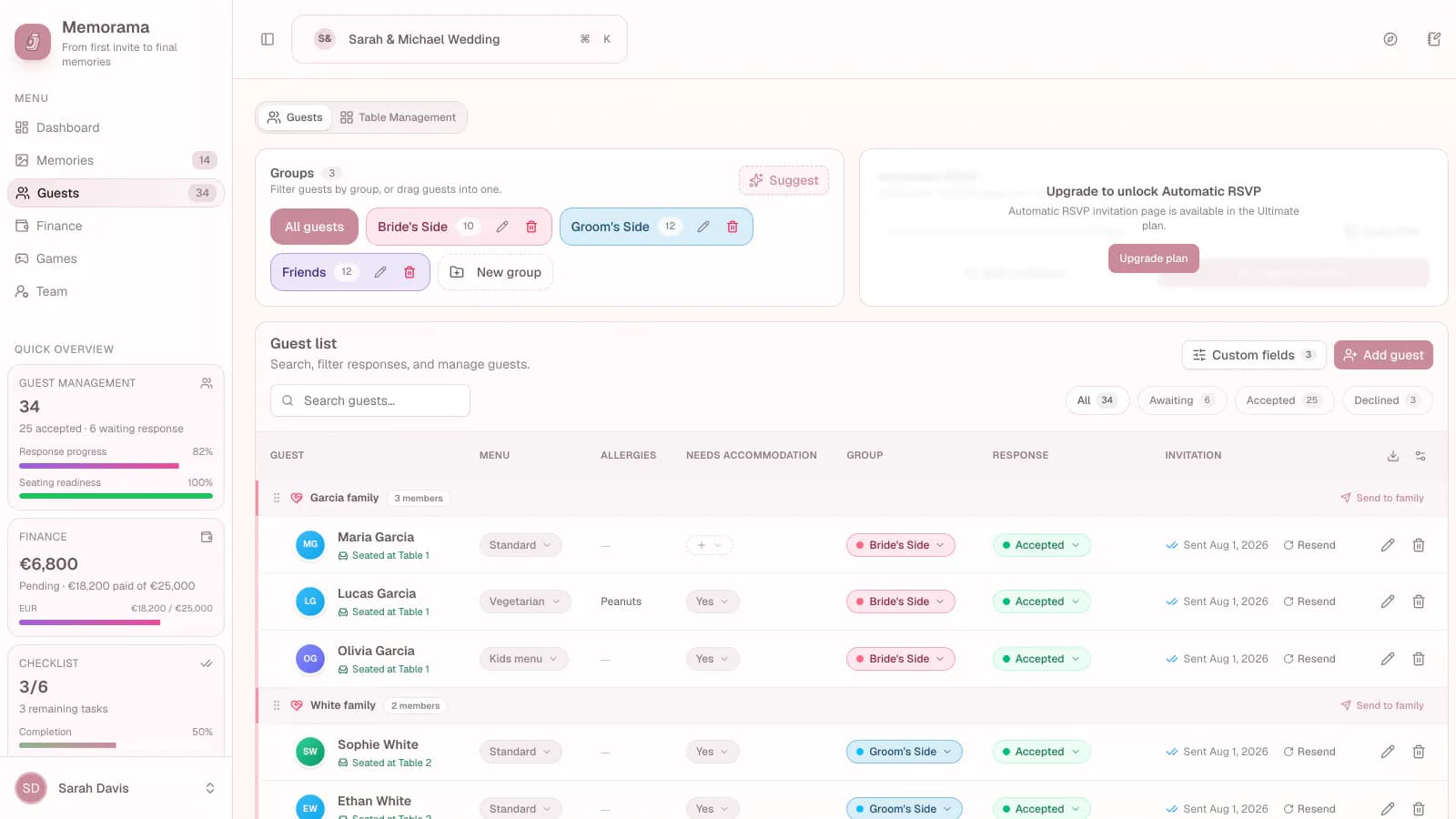
A closer look at custom guest fields.
Made for real event planning
Memorama brings practical tools together, so the details stay organized before the celebration and the moments stay close afterward.
Simple workflow
Start from suggestions like menu or allergies, or write your own question.
Turn on the fields guests should answer. Each companion answers for themselves.
See totals for each answer and export the guest list with every answer in its own column.
FAQ
Up to 30 custom fields per event.
Yes. Each person on the reply gets the same questions, so you know the menu or allergies for everyone.
Yes. Leave “Ask on the invitation” off and only you and your collaborators see and fill it in.
Explore more
From first invite to final memories
Start planning for free, then bring guests, logistics, and memories into one place.
Start planning for free